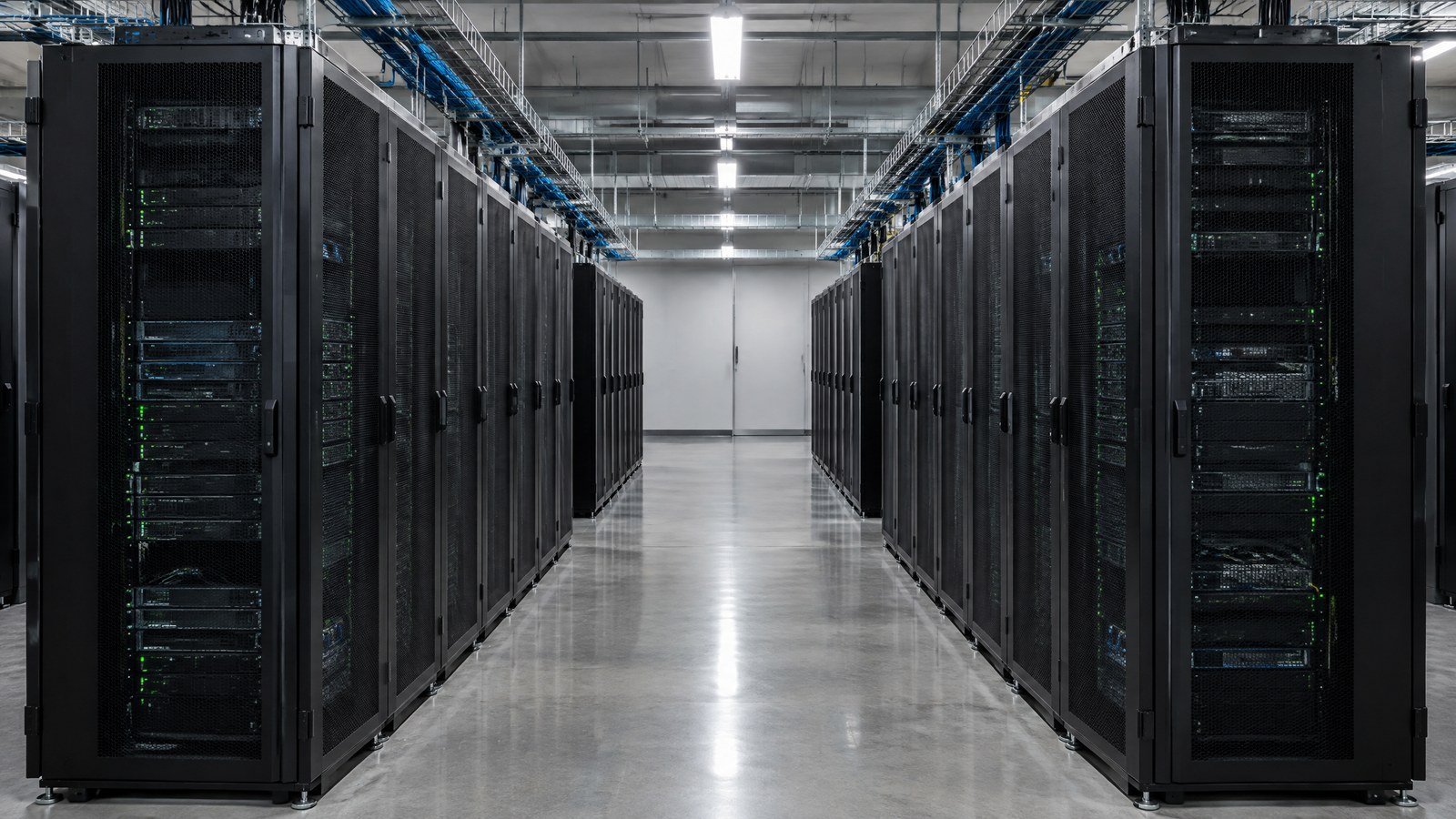
A data centre is a physical facility that brings together servers, storage and networking, with the power, cooling and security needed to keep them useful. Understanding those systems makes it easier to see how websites, cloud services and AI applications work—and why reliability takes more than adding extra computers.
On this page 12 sections
- What Is a Data Centre?
- How Does a Data Centre Work?
- Main Components of a Data Centre
- Different Types of Data Centres
- Technologies Used in Modern Data Centres
- Data Centre vs Cloud Computing: What Is the Difference?
- Why Do Data Centres Need Advanced Cooling Systems?
- How Do Data Centres Keep Information Secure?
- Energy Use and Environmental Impact
- Important Points / Key Information
- Examples / Supporting Information
- Conclusion
Part of our computer hardware technology guide library
What Is a Data Centre?
A data centre can be a dedicated room, a building or a larger facility housing IT equipment. Its purpose is to run applications and hold the information those applications need. IBM's infrastructure explanation includes computing, storage and networking alongside the environmental systems that support them. [1]
Think about the difference between an office laptop and a server. Both contain processors, memory and storage, but a server is configured to provide a service to other systems. It might run a website, handle database queries or process a scientific calculation. A data centre supplies the shared environment in which many such systems operate.
The familiar rows of cabinets are called racks. Inside them, servers sit beside storage and network equipment. Much of the work is less visible: electrical distribution, cooling plant, alarms, access controls and the staff who maintain the facility.
Why Everyday Services Depend on This Infrastructure
Email, online shopping, video streaming, business software and many banking services use remotely hosted computing. Universities and hospitals also use data-centre systems for research and records. AI services may use specialised computing clusters for training models or generating responses. [1] [5]
Not every tap on a phone travels to one central building. An app can do some work on the device, while a content-delivery network can serve a cached copy nearer the user. The underlying service may involve several facilities. The important question is which part of the work happens where, rather than imagining that the entire internet sits in one server room.
How Does a Data Centre Work?
For a typical remotely hosted application, the basic flow is a request, some computing work and a response. The steps below are a simplified explanation, not the design of a specific bank or cloud provider. [1]
Step 1: A Request Reaches the Service
Your device sends a request through a network connection. Routing carries it towards the service, sometimes through an edge location or cache before reaching the main application.
Within the service infrastructure, security controls apply traffic rules. A load balancer can distribute requests among available application instances. The exact order of those systems varies; there is no single entrance arrangement used by every data centre.
Step 2: Servers Run the Application
An application server performs the requested work. That might mean checking whether a user is authorised, retrieving a page or calculating a result. A larger application can divide these jobs among multiple services instead of using one machine for everything.
Adding servers can help capacity, but the software and database must also be designed to share the work. A bottleneck in storage or a dependent service can still delay a response.
Step 3: Storage Supplies and Records Information
Storage holds databases, documents, media and application files. Servers may use their own local drives or shared storage accessed over a network. Solid-state drives suit many workloads needing quick access; hard drives remain useful where capacity and cost matter. The choice depends on the workload. [1]
A storage system can keep redundant copies to tolerate particular hardware failures. That is not the same as a recoverable backup. If an application deletes the wrong records and that change is copied to replicas, an independent recovery copy may still be needed.
Step 4: Networks Carry the Result Back
Switches connect equipment inside the facility. Routers connect networks and direct traffic towards other locations. Fibre-optic and copper connections both have roles; the medium depends on distance, equipment and bandwidth requirements. [1] [5]
The response then travels back to the device. Its speed depends on distance, network conditions, application work and any other services involved. A data centre alone cannot promise that every request finishes within a particular number of milliseconds.
Step 5: Power and Cooling Support the Whole Process
Electrical systems distribute power to the equipment. An uninterruptible power supply, or UPS, can bridge a supply interruption within its designed capacity and runtime. Generators or other backup arrangements can support longer interruptions where they are installed. [1]
Meanwhile, cooling removes heat from the equipment. These systems operate alongside the computing work, not only after a request finishes. Their resilience depends on capacity, maintenance, monitoring and the actual failure being handled.
Main Components of a Data Centre
The equipment works as a system. A powerful server is not useful if its network is unavailable or its cooling cannot remove the heat it produces. [1]
Monitoring ties these components together. Temperature, power and equipment-status readings help operators spot changes. A sensor reading is useful only when teams understand the equipment, know who should respond and have a suitable response plan.
| Component | What it does |
|---|---|
| Servers | Run applications and computing tasks using processors, memory and other hardware. |
| Storage systems | Keep databases, files and recovery copies on local or shared storage. |
| Network switches | Connect servers and other equipment within the facility. |
| Routers | Connect networks and direct traffic between locations. |
| Cooling systems | Carry heat away and maintain supported equipment conditions. |
| Power distribution units | Distribute electrical power to racks and connected equipment. |
| UPS and backup power | Support continuity during specified supply interruptions, within their limits. |
| Fire detection and protection | Detect hazardous conditions and support a professionally designed response. |
What Redundancy Can—and Cannot—Do
Redundancy means providing another component or path for a defined function. Extra cooling equipment, network paths or power feeds can reduce the impact of some failures. They do not automatically protect against a shared dependency, an incorrect software change or a building-wide event. [1]
Recovery planning adds another question: if something does fail, can the service and its data be restored? Backups need appropriate protection and recovery testing. A second copy that nobody has successfully restored is not strong evidence of recoverability.
Different Types of Data Centres
The usual labels describe ownership, service model, scale or location. They overlap: a cloud provider can operate at hyperscale while leasing space in a colocation facility. [1]
| Type | Main characteristic | Typical reason to use it |
|---|---|---|
| Enterprise | Dedicated to an organisation's own systems. | Control over equipment, operations and specific requirements. |
| Colocation | Customers place equipment in a provider's facility. | Access to managed space, power, cooling and connectivity. |
| Cloud | Infrastructure supports cloud services. | Access to computing resources without owning each physical server. |
| Hyperscale | Designed for very large, scalable workloads. | Large cloud, internet and AI services. |
| Edge | Computing is placed closer to users or devices. | Reduce some network travel and support local processing. |
Enterprise and Colocation
An enterprise facility gives an organisation responsibility for its own infrastructure. That control comes with the cost and work of operating it.
With colocation, a business typically retains its equipment while renting the supporting environment. The provider's services and the customer's duties depend on the agreement. Renting rack space is not necessarily the same as buying a fully managed application. [1]
Cloud, Hyperscale and Edge
Cloud facilities support resources delivered through cloud-service models. Hyperscale describes large-scale infrastructure; it does not mean every application in the building is an AI workload.
Edge infrastructure moves selected work closer to its users or devices. It can reduce one source of delay, but cannot remove all latency. Application processing, network quality and other dependencies still matter.
Technologies Used in Modern Data Centres
Modern facilities combine physical equipment with software that allocates resources and monitors their condition. The technologies used depend on the workload, rather than a requirement that every facility install every new product. [1]
Virtual Machines and Containers
Virtualisation allows a physical server to support multiple virtual machines through a hypervisor. Each virtual machine can have its own guest operating system, applications and assigned resources. [7]
Containers package applications and their dependencies while normally sharing a host operating-system kernel. They are not simply smaller complete virtual machines. The two approaches can also be combined: containers can run inside virtual machines. Their isolation and management needs differ. [7]
High-Speed Networking and Automated Management
Applications need connections between computing and storage, not just an internet link. Large distributed workloads can require substantial bandwidth between machines. Multiple network paths can improve resilience when the topology and controls are designed for it. [1] [5]
Data Centre Infrastructure Management, often shortened to DCIM, brings facility information into a management view. Power, cooling and equipment data can help teams understand capacity and investigate alarms. Automated systems can assist with monitoring or provisioning, but still need permissions, change controls and human ownership. [1]
AI-based analysis can support tasks such as finding unusual patterns in monitoring data. That is a capability, not a promise that software predicts every failure or prevents every outage.
GPU Computing for AI
Graphics processing units, or GPUs, are useful for workloads with substantial parallel calculations. AI training can use many accelerators working together, supported by storage, memory and fast interconnects. Running a trained model—called inference—can have different hardware needs from training it. [5]
A GPU is not a universal replacement for a CPU. General application work still uses CPUs, and the best hardware depends on the calculation, software and required performance. Our AI infrastructure explainer covers the differences between accelerator roles in more detail.
Data Centre vs Cloud Computing: What Is the Difference?
A data centre is the physical environment. Cloud computing is a model for accessing a pool of resources through a network, with capabilities such as on-demand provisioning and measured use. NIST's definition includes private as well as public deployment models. Owning a server room does not, by itself, make it a cloud. [6]
An organisation can combine its own systems with cloud services. The practical decision depends on its workload, recovery needs, data handling and operating capacity—not a rule that one approach is always cheaper or more secure. [1] [2]
| Aspect | Data centre | Cloud computing |
|---|---|---|
| What it describes | Physical IT and supporting facility infrastructure. | How computing resources are offered and accessed. |
| Ownership | Can be owned, leased or operated for customers. | Can be privately operated or supplied by a public-cloud provider. |
| Capacity | Ultimately limited by installed and available equipment. | Can allocate pooled capacity rapidly, subject to service limits and availability. |
| Management | Includes facilities, equipment and operating responsibilities. | Responsibilities depend on the service and deployment model. |
Why Do Data Centres Need Advanced Cooling Systems?
Computing equipment releases heat as it uses electricity. Cooling moves that heat away so hardware can remain within its supported operating conditions. Higher heat density can make the heat-removal path more demanding, even without a larger room. [1] [4]
Air Cooling and Airflow Management
Air-cooled systems deliver cooler air to equipment and remove the warmer exhaust. Hot- and cold-aisle arrangements, containment and sensible rack layouts help reduce unwanted mixing. The goal is to deliver cooling where it is needed, not simply make the entire room feel cold. [1]
The useful measurements include equipment inlet conditions and the state of the cooling system. There is no universal room temperature that makes every server and installation safe. Equipment specifications and qualified facility design govern the limits.
Direct-to-Chip and Other Liquid-Cooling Approaches
In direct-to-chip cooling, cold plates transfer heat from selected components to a circulating coolant. Heat exchange then carries that heat towards the facility's heat-rejection system. The coolant does not need to contact exposed electronic circuitry. [4]
Other approaches include rear-door heat exchangers and immersion systems using suitable fluids. A liquid-cooled installation may still need air cooling for components not connected to cold plates.
Liquid cooling adds its own equipment, interfaces and maintenance requirements. It is not automatically simpler, and a rack-power figure alone cannot decide which approach is appropriate. The site's liquid-cooling operations guide explains those differences without treating every installation as interchangeable.
How Do Data Centres Keep Information Secure?
Security combines physical controls, digital controls and operating practices. Microsoft, for example, documents layered access approval and restricted access within its Azure facilities. That is a named operator's approach, not a claim that every data centre uses identical controls. [3]
Protect the Facility and the Systems
Physical controls can include approved access, visitor supervision and monitoring. Digital controls include authentication, least-privilege permissions, network restrictions, security updates and logs. Encryption protects information in storage or in transit when implemented appropriately, with keys that also need protection. [1] [2]
Monitoring helps teams investigate suspicious behaviour and equipment faults. It does not make attacks impossible. Backup and disaster-recovery plans support recovery, while access controls help prevent the incident in the first place.
Energy Use and Environmental Impact
A data centre uses electricity for IT equipment and for supporting systems such as cooling and power conversion. The total impact depends on workload, facility design, electricity supply and local conditions—not only its floor area. [8] [10]
In its April 2026 update, the International Energy Agency reported that global data-centre electricity demand grew 17% in 2025. Its updated central outlook puts consumption at roughly 485 terawatt-hours in 2025 and projects about 950 terawatt-hours in 2030. The 2030 figure is a projection, not an achieved result or a forecast for any particular Indian facility. [8] [9]
What Power Usage Effectiveness Measures
Power Usage Effectiveness, or PUE, compares total facility energy with IT-equipment energy over the same measurement period and boundary. In this electricity-based explanation, divide the facility's electricity consumption by the IT equipment's electricity consumption. [10]
A lower PUE indicates less supporting-infrastructure electricity relative to IT electricity. It does not tell you how useful the computing work is, how much water the site uses or how much carbon its electricity produces. Lawrence Berkeley National Laboratory explicitly separates infrastructure efficiency from IT-equipment efficiency. [10]
Why One “Green” Number Is Not Enough
Reducing cooling overhead is useful, but a facility can still consume more electricity overall if its computing workload grows. Water use, local grid effects, hardware lifecycle and the timing and source of electricity need separate consideration. A low PUE alone is not evidence that a site is carbon-free or has no environmental cost.
Important Points / Key Information
- A data centre combines IT equipment with supporting power, cooling, protection and management systems.
- Cloud computing is a resource-delivery model. It can be public or private and does not require the customer to own the building. [6]
- Enterprise, colocation, cloud, hyperscale and edge labels describe different aspects and can overlap.
- Replication supports defined availability needs; backups support recovery from events that live copies may reproduce.
- Air and liquid cooling must fit the equipment and complete heat-removal path. Avoid universal capacity or temperature claims.
- GPU suitability depends on the workload. Not every server or AI task needs the same accelerator setup.
- Availability and security depend on the application and operating practices as well as the facility.
- PUE measures infrastructure overhead relative to IT energy, not overall sustainability. [10]
Examples / Supporting Information
Example 1: Reading a Website
A visitor opens a website. If a suitable cached copy is available, an edge server may answer. If the request needs the application, it travels to the relevant service, which may read from a database before returning a response.
This teaching example shows why a website involves both application infrastructure and delivery networks. It is not a measured performance test. Our content-delivery network explainer follows the cache-and-origin relationship further.
Example 2: A PUE Calculation
Suppose a fictional facility uses 1,250 kilowatt-hours of electricity during a measurement period, while its IT equipment uses 1,000 kilowatt-hours over that same period and boundary. Its PUE is 1,250 divided by 1,000: 1.25 .
The remaining 250 kilowatt-hours represents supporting electricity within that boundary. This is an arithmetic example, not a reading from a real facility. It says nothing by itself about water consumption, carbon emissions or how efficiently the servers completed their work. [10]
Frequently Asked Questions
Is a data centre the same as cloud computing? No. A data centre is a physical facility; cloud computing is a model for providing computing resources. A private cloud can run in an organisation's own infrastructure. [6]
Does backup power prevent every outage? No. It supports specified power interruptions within its capacity, but cannot independently solve application bugs, all equipment faults or every shared failure.
Do all data centres use liquid cooling? No. Cooling choices depend on equipment and facility design. Air, liquid and combined approaches can serve different needs. [1] [4]
Are replicas the same as backups? No. Replicas can copy an unwanted change as well as a useful one. Recovery needs a suitable protected copy and a tested restoration approach.
Are all data centres built for AI? No. Facilities support many workloads. AI-focused clusters may require specialised accelerators, networking, memory and cooling. [5]
Conclusion
A data centre works because computing, storage, networking and facility systems support one another. Servers perform the work, but power, cooling, security and recovery practices determine whether that work remains available and trustworthy.
The most useful way to understand a facility is to follow a request and ask what each supporting system contributes. Then separate the claims: a fast network is not a recovery plan, extra equipment is not an uptime guarantee, and a low PUE is not a complete environmental assessment. Those distinctions make cloud and AI infrastructure easier to judge without relying on impressive-looking racks or headline numbers.
How we checked thisSources (10)
We keep source links private so your reading stays on techduopulse. Each note names the publisher and document we checked.
IBM — What is a data center?
Primary source · Facility definition, components, redundancy, types and managementMicrosoft — Shared responsibility in the cloud
Primary source · Security ownership varies by IaaS/PaaS/SaaS, customers retain identity/data dutiesMicrosoft — Azure facilities, premises, and physical security
Primary source · Azure layered security and availability-zone definition; not universal all-provider controlsSchneider Electric — Rethinking data center cooling for AI: The rise of direct-to-chip liquid cooling
Primary source · Cold plates, liquid circuits and facility heat rejection; omit marketing savings and universal rack limitsIBM — What is an AI data center?
Primary source · Workload-specific accelerators, storage and interconnectsNIST — The NIST Definition of Cloud Computing — SP 800-145
Primary source · Cloud resource-delivery definition and deployment modelsIBM — Containers versus virtual machines (VMs): What’s the difference?
Primary source · Guest operating systems versus host-kernel process isolationInternational Energy Agency — Key Questions on Energy and AI — Executive summary
Primary source · 485 TWh 2025 baseline and 950 TWh 2030 central projection; not a guaranteeInternational Energy Agency — Data centre electricity use surged in 2025, even with tightening bottlenecks driving a scramble for solutions
Primary source · Observed global electricity-demand growth of 17% in 2025Lawrence Berkeley National Laboratory — 2024 United States Data Center Energy Usage Report
Primary source · PUE definition, infrastructure versus IT-efficiency distinction and separate water/carbon measuresInitial source-backed explainer edition; owner-commanded manual publication. Reviewed against retained sources; no hands-on testing claimed.