SEO title: Touch Sensor: How It Works and Its Types Meta description: Learn what a touch sensor is, how capacitive and resistive touch work, and where phones, kiosks and other everyday devices use them.
This article is part of the software engineering technologies guide library.
What is a touch sensor?
A touch sensor is an input device that detects contact or near-contact and turns it into an electrical signal. In a touchscreen system, three roles are separate:
Sensor: notices an interaction on or near the surface.
Controller: measures the sensor signals and calculates a location or touch event.
Software: maps that event to an action, such as opening an app, selecting a ticket option or moving an on-screen object. [1]
So, a touch sensor is not automatically a complete display or a complete user interface. It is the sensing layer or sensing structure that supplies input to the rest of the system.
How does a touch sensor work?
The touch sensor working principle depends on the technology. The controller first establishes a baseline electrical or physical signal. When a finger, stylus or pressure changes that signal, the controller compares the change with its expected baseline and estimates where the interaction occurred. Software then decides how to use the result. [1]
A useful plain-language rule is:
A touch sensor looks for a measurable change caused by touch—often pressure, capacitance, sound waves or interruption of light—not merely the presence of a hand.
Common touchscreen sensing families include resistive, capacitive, surface acoustic wave and optical methods. Capacitive and resistive technologies are particularly helpful starting points because they show two very different ways of detecting a touch. [2]
### Capacitive touch: changing an electric field
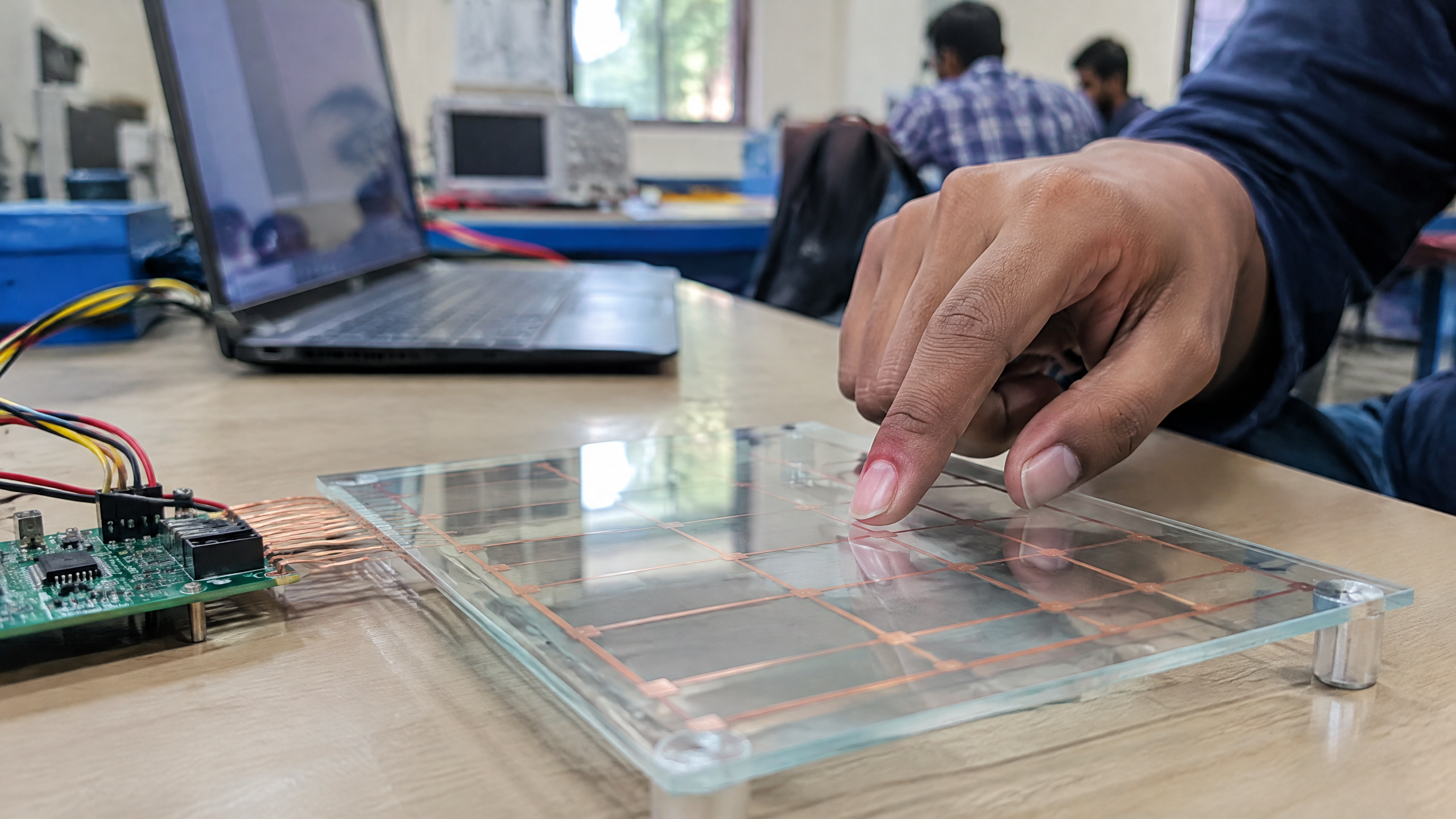
A capacitive touch sensor measures a change in capacitance at a conductive sensing element. Behind an insulating cover, conductive electrodes create an electric field or coupling pattern. A finger or another suitable conductive object changes that field/coupling, and the electronics measure the change. Transparent conductive materials such as indium tin oxide (ITO) are one example used in display touch structures; they are not required in every touch-sensor design. [3] [4]
There are two common capacitive arrangements:
Self-capacitance: Each electrode is measured relative to earth/ground. A touch commonly increases the measured capacitance. Texas Instruments describes a typical touch contribution of roughly 1–10 pF, but that is an engineering reference range, not a universal value for every device. [3]
Mutual capacitance: The system measures coupling between transmit and receive electrodes. A finger disturbs the field and typically reduces that coupling. The more defined field can support a dense electrode matrix and multi-touch designs, subject to the implementation. [3]
This is why a capacitive screen should not be described simply as a “finger detector.” Its response depends on the electrode design, cover, electronics and signal processing—not on one universal rule about all fingers or all objects.
### Resistive touch: making layers contact under pressure
A resistive touch sensor uses a different approach. It typically has conductive layers separated until pressure brings them into contact. The resulting voltage or current change lets the controller calculate the touch position. Because it senses pressure-driven contact, a resistive panel can be operated with a finger or a stylus. [1] [2]
This is a useful contrast: capacitive systems look for a capacitance/coupling change, while resistive systems look for pressure bringing conductive layers together. The screen surface alone does not reveal which system is underneath.
Main touch screen sensor types
The table gives a compact comparison of the main families discussed in the research. Actual behaviour depends on the particular design and controller.
| Sensor type | What the sensor detects | Practical point to remember |
|---|---|---|
| Capacitive | A change in capacitance or electrode coupling | Can use self- or mutual-capacitance sensing; multi-touch capability depends on the implementation. [3] |
| Resistive | Pressure making conductive layers contact | Can work with a finger or stylus. [1] |
| Surface acoustic wave | A touch-related change in acoustic-wave behaviour at the surface | One of several touchscreen families; not every screen uses it. [1] [2] |
| Optical | A touch-related interruption or optical change | Another recognised touchscreen family, alongside resistive, capacitive and acoustic approaches. [2] |
Where are touch sensors used?
Touch sensors create a direct way to give instructions to an electronic system. Familiar uses include:
Phones and tablets: selecting, scrolling and typing through a display interface.
Kiosks and interactive displays: choosing options in public information, ticketing or service interfaces.
Appliances and control panels: presenting a flat, software-defined control surface instead of separate mechanical buttons.
Education and student electronics: demonstrating capacitance, pressure sensing, controller inputs and user-interface design.
Special-purpose equipment: using a touch surface where a device designer needs a compact human input method.
In each case, the sensor is only one part of the experience. A delayed response, an incorrect location or an unintended touch can come from sensor conditions, controller tuning or the software that interprets the input.
Limitations, accuracy and calibration: why touch is not always identical
A touch sensor does not have one universal accuracy figure. In capacitive designs, sensitivity and false-touch performance can be affected by electrode layout, overlay thickness and material, parasitic capacitance, grounding, shielding, electrical noise and contamination. [3] [5] These factors help explain why a surface may behave differently after a design change or in a different installation.
The controller also has to distinguish a real touch from normal signal variation. That is why a baseline and thresholds matter. Calibration or tuning should be understood as configuring a particular sensor-plus-overlay-plus-electronics system, rather than applying a single setting that guarantees behaviour everywhere. In practical systems, designers need to consider the intended cover material, mechanical arrangement, grounding and environmental conditions. [3] [5]
For a user, the takeaway is modest but useful: avoid treating every missed or unexpected response as proof that “the sensor is broken.” It may reflect the sensing method, the object touching it, the surface condition, electrical noise or the system’s calibration. Conversely, a responsive screen is not evidence of a particular sensor type without design information.
A simple way to explain touch sensing
If you are explaining touch sensing in a school or college setting, begin with the signal chain:
touch or pressure → measurable electrical/physical change → controller calculates an event or position → software performs an action.
Then choose one example. For capacitive touch, say that a finger changes an electric field around electrodes through an insulating cover. For resistive touch, say that pressure brings conductive layers together. This approach is more accurate than saying that all touchscreens work in exactly the same way. [1] [3]
FAQs
What is a touch sensor?
A touch sensor is an input device that detects touch or near-touch and converts it into a signal. In a touchscreen system, the controller works out the event or location, while software maps it to an action. [1]
How does a touch sensor work?
It measures a touch-related change against a baseline. That change may be pressure-driven contact in a resistive panel or a capacitance/coupling change in a capacitive sensor; the controller interprets the signal and software uses the result. [1] [3]
What is a capacitive touch sensor?
It is a sensor that measures a change in capacitance at conductive electrodes, often through an insulating overlay. Self-capacitance measures an electrode relative to ground, while mutual capacitance measures coupling between transmit and receive electrodes. [3] [4]
What is a resistive touch sensor?
A resistive touch sensor detects pressure that brings conductive layers into contact. The electrical change is used to calculate position, and the method can work with a finger or stylus. [1] [2]
What are the main touch screen sensor types?
Recognised touchscreen families include resistive, capacitive, surface acoustic wave and optical technologies. A particular device uses one design; it is not correct to assume every touchscreen is capacitive. [2]
For a touch sensor project for students in India, what should the explanation include?
Focus on the sensing principle rather than treating the module as a black box: identify what changes on touch, how the controller detects that change, and how the output becomes an action. For a concise “touch sensor in Hindi” explanation, the core idea is: “Sparsh se sensor ka electrical signal badalta hai; controller us badlav ko pehchankar command banata hai.” The exact circuit and behaviour depend on the sensor design. [1] [3]
Related reading
/article/proximity-sensor-types-working
/article/light-sensor-working-principle-types
/article/force-sensor-working-principle
---
Source notes
Reporting record
techduopulse stores source destinations privately. Public notes remain non-clickable so every visitor journey stays on this website.
https://www.loc.gov/item/how-does-a-touch-screen-work/
Primary source · Research source 1https://pmc.ncbi.nlm.nih.gov/articles/PMC8309784/
Primary source · Research source 2https://software-dl.ti.com/msp430/msp430_public_sw/mcu/msp430/CapTIvate_Design_Center/1_83_00_08/exports/docs/users_guide/html/CapTIvate_Technology_Guide_html/markdown/ch_basics.html
Primary source · Research source 3https://people.eecs.berkeley.edu/~boser/courses/49_sp_2019/L3_3_touch.html
Primary source · Research source 4https://www.microchip.com/en-us/application-notes/an2934
Primary source · Research source 5New India-focused sensor explainer covering touch sensor, working principles, uses and limitations.