SEO Title: Sound Sensor: Working, Uses and Arduino Basics Meta Description: Learn what a sound sensor is, how a microphone turns sound into an electrical signal, its uses, limits and basic Arduino readings in India.
This article is part of the software engineering technologies guide library.
What is a sound sensor?
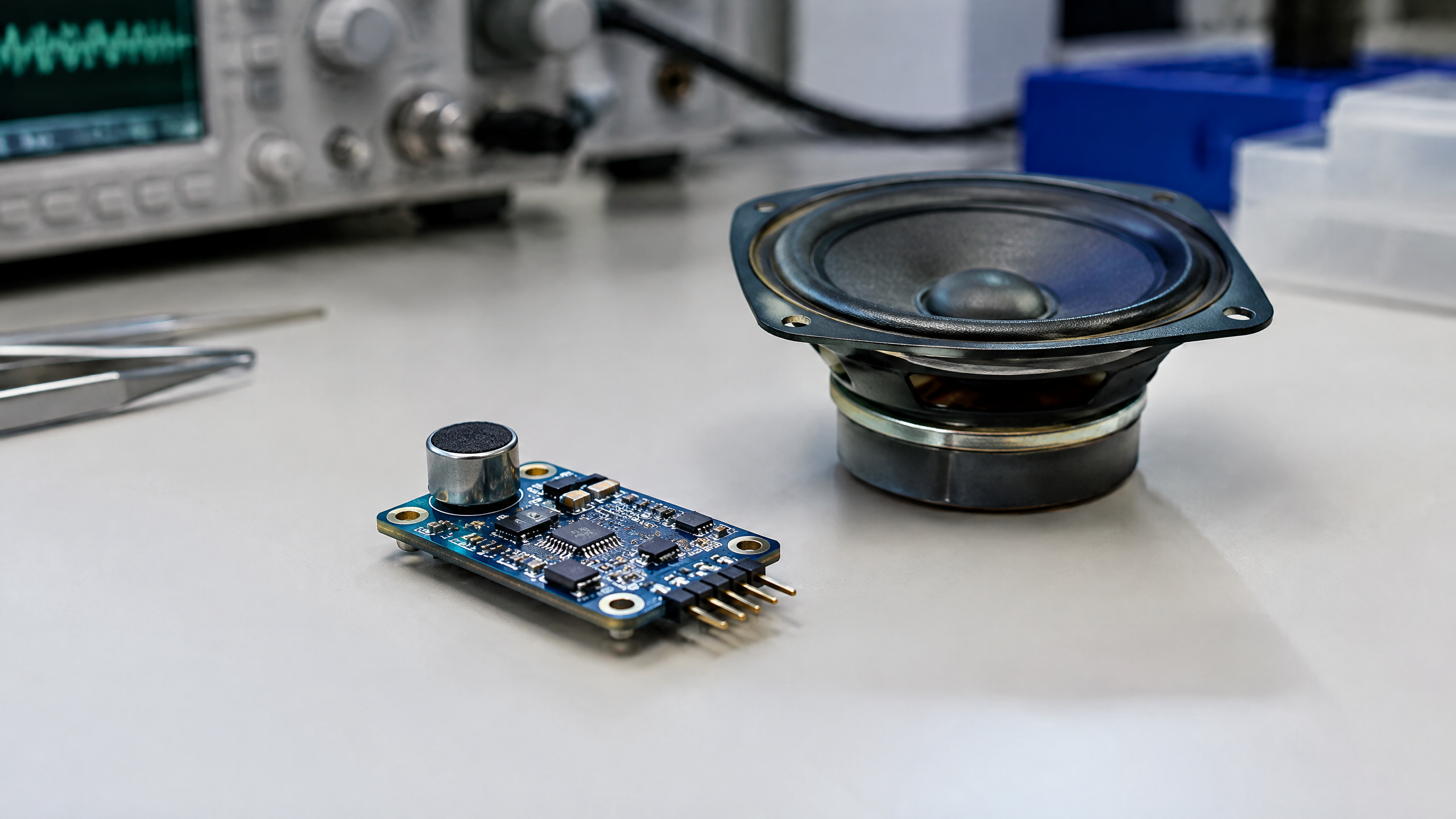
A sound sensor is a sensing system that detects acoustic pressure variations and turns them into an electrical signal. In many low-cost sound sensor modules, the part that first receives the sound is a small microphone. Its diaphragm moves very slightly as a sound wave reaches it. Electronics on the module then condition that tiny change into an output that a microcontroller can read. [1]
Everyday search terms can blur useful distinctions:
A microphone is the transducer that converts sound into an electrical signal.
A sound detection sensor or basic sound sensor module often uses that microphone to detect sound or a relative change in sound.
A sound intensity sensor may describe a device intended to compare signal levels, but its output is not automatically a standard sound-intensity measurement.
A sound-level meter is a different measurement instrument. A decibel result requires a defined measurement chain and calibration, rather than simply a microphone module with a changing output.
Thinking about the intended job prevents overclaiming. A clap-triggered light can often work with a simple detector. Noise monitoring for a formal measurement or compliance decision calls for appropriate calibrated instrumentation instead.
Sound sensor working principle: how a device “hears”
The signal path is easier to understand in four steps:
Sound creates pressure changes. Speech, a clap or a machine produces air-pressure variations that travel as sound waves.
The microphone responds. The wave moves the microphone diaphragm or plate. In the Arduino Sensor Kit example, this motion changes an electrical property, which changes the voltage seen by the circuit. [1]
The module conditions the signal. Because the microphone signal is small, a module may amplify or otherwise process it. For example, Seeed’s Grove Sound Sensor uses an electret microphone, an LM358 amplifier and an analogue output; those details belong to that module, not to every product called a sound sensor. [2]
A circuit reads or compares the output. A microcontroller can sample an analogue voltage, or a comparator circuit can turn a chosen threshold into a simple digital “sound detected” trigger.
A louder or closer sound may produce a larger raw response in a particular setup, but the result also depends on the microphone, gain, distance, direction, enclosure, background noise and code. It is therefore best to interpret a basic module as showing change relative to that setup, not as showing a universal loudness scale. [1]
Main types of sound-sensing setup
The most practical way to group sound sensors is by the job their output performs.
| Type of setup | Typical output | Good for | Important boundary |
|---|---|---|---|
| Microphone with analogue output | A changing voltage | Inspecting relative sound changes with a microcontroller | Raw values do not automatically equal dB |
| Threshold sound sensor module | Digital trigger, sometimes plus analogue output | Clap or knock triggers, simple alarms and interactive projects | Threshold must be set and tested in the real environment |
| Audio-oriented microphone system | A signal intended for audio processing | Projects that need to analyse audio with suitable hardware/software | A basic detection module is not necessarily suitable for intelligible recording |
| Sound-level meter | A specified sound-pressure reading | Measurement work needing defined procedures and traceability | It needs suitable calibration and instrument performance, not just a sensor module |
A basic module is usually the least complicated starting point for learning. Seeed specifically describes its Grove module as a sound-presence detector and says it should not be used to collect sound as a recording device. [2]
Sound sensor uses in daily life, classrooms and projects
Sound sensing is useful when the project needs an event or trend rather than a perfect record of audio. Examples include:
Classroom demonstrations: a clap can trigger an LED sequence or show how a physical signal becomes a number.
Arduino and robotics projects: a robot can react to a loud knock or use a sound event as one input among several.
Interactive exhibits: a display can respond when visitors clap or speak nearby, after its threshold has been tuned for the venue.
Machine or room observation: a system may flag that a familiar environment has become noticeably louder, then prompt a human to check it.
Phone and consumer electronics: microphones are used for audio features, calls and voice interfaces, although the complete system is much more capable than a simple hobby module.
In an Indian school lab, makerspace or home project, a clap-activated LED is a useful learning exercise because it makes the full chain visible: sound, microphone response, electrical output, code and an action. It does not demonstrate that the circuit can reliably identify a person, understand words or judge noise exposure.
Sound sensor with Arduino: the beginner view
An Arduino can read an analogue sound-sensor output through an analogue input. On an Arduino UNO, analogRead() uses a 10-bit analogue-to-digital conversion by default: with the default reference, 0–5 V is represented by integer readings from 0 to 1023. The actual usable range depends on the board and reference configuration. [3]
A sensible beginner workflow is:
Connect the module according to its documentation and use the correct supply and ground for the board.
Read and print raw values while the room is relatively quiet.
Make a clap or other test sound at the distance relevant to the project.
Observe the range and variation rather than choosing a threshold from an online example.
Set an initial threshold or change-detection rule, then retest with ordinary background noise.
Add a short delay, averaging or other logic only after observing what false triggers and missed triggers look like in that location.
A fixed threshold copied from one sound sensor Arduino tutorial is not portable. Room acoustics, fan noise, microphone placement, module gain, the Arduino reference and even the sound event itself can change the raw readings. Treat Arduino values as project data to examine, not as a ready-made decibel figure.
Accuracy, calibration and the difference between readings and decibels
The most common misunderstanding is to treat a raw analogue number as dB. A number from a module is an electrical reading after that module’s microphone and circuitry; it is not automatically a sound-pressure level. Converting a sound-related signal into a defensible dB measurement requires a defined measurement chain, calibration and specified frequency and time weighting.
IEC 61672-1 describes performance requirements for time-weighting, integrating-averaging and integrating sound-level meters, including Class 1 and Class 2 categories. That standard is why a hobby module should not be described as IEC-compliant merely because it responds to sound. [4]
For a sound-detection project, calibration is often practical rather than formal: establish a baseline in the actual room, test the event to be detected, adjust the threshold and repeat after changing placement. This can improve a specific project’s behaviour, but it does not certify the reading or guarantee detection under every condition.
Placement matters. Keep the microphone away from direct airflow, rubbing surfaces and vibration where possible; do not hide it in an enclosure that blocks or colours the sound without retesting. Background sounds from fans, traffic, appliances, conversation and echoes can all affect a threshold. For any health, workplace, regulatory or safety decision related to noise, use an appropriate calibrated instrument and follow the relevant procedures rather than relying on a hobby module.
Limits and responsible use
A sound sensor has no built-in understanding of meaning. A module may react to a clap, a dropped object, a passing vehicle or a nearby fan if their signals cross its threshold. It may also miss a desired event if the sound is too quiet, too far away or masked by other noise.
If a project processes or records audio, privacy and consent deserve separate consideration. A basic detection module can support event-based interaction without being a recording system, but a microphone connected to audio-processing hardware may raise different expectations for people nearby. Design the project so its capability and purpose are clear, particularly in classrooms, shared homes and public-facing installations.
Frequently asked questions
1. Sound sensor kya hai?
A sound sensor is a device or module that converts changes caused by sound waves into an electrical signal. In beginner modules, a microphone commonly provides the sensing element, while the rest of the circuit makes the signal easier for a controller to read. [1]
2. Sound sensor ka use in Hindi: where can it be used?
The common use is to detect that sound has occurred or changed—for example, a clap-triggered light, a simple robotics input or an interactive classroom project. Its suitability depends on testing in the actual location; a basic module should not be assumed to identify speech or provide a certified noise measurement.
3. What is the sound sensor working principle in Hindi or English?
Sound moves a microphone diaphragm, producing a small electrical change. Module electronics amplify or condition that signal, and a microcontroller can read it as a changing analogue value or compare it with a threshold to create a digital trigger. [1] [2]
4. Can I use a sound sensor with Arduino?
Yes, an Arduino can read a compatible module’s analogue output or digital trigger. Start by observing raw readings in quiet and noisy conditions, then tune the project logic for your own room and module. On an Arduino UNO, analogue readings are 10-bit by default, subject to the configured reference. [3]
5. How does a sound sensor module with Arduino Uno work?
The module converts sound into a voltage or trigger, and the UNO reads that output. Your sketch then decides what counts as an event—for example, a value or change above a tested threshold. The threshold is a setup choice, not a universal specification.
6. Is a KY-038 sound sensor with Arduino suitable for measuring decibels?
A KY-038-style beginner module can be used to explore sound-triggered behaviour with Arduino, but its raw output should not be presented as a calibrated dB result. Proper sound-level measurements require suitable instrumentation, a defined setup and calibration. [4]
Related reading
[Ultrasonic sensor](/article/ultrasonic-sensor-working-uses)
[Light sensor](/article/light-sensor-working-principle-types)
[Touch sensor](/article/touch-sensor-working-types)
[Accelerometer](/article/accelerometer-explained)
Source notes
Reporting record
techduopulse stores source destinations privately. Public notes remain non-clickable so every visitor journey stays on this website.
https://support.google.com/trends/answer/4365533?hl=en
Primary source · Research source 5https://support.google.com/trends/answer/4355000?hl=en
Primary source · Research source 6https://sensorkit.arduino.cc/sensorkit/module/lessons/lesson/06-the-sound-sensor
Primary source · Research source 1https://wiki.seeedstudio.com/Grove-Sound_Sensor/
Primary source · Research source 2https://docs.arduino.cc/language-reference/en/functions/analog-io/analogRead/
Primary source · Research source 3https://webstore.iec.ch/en/publication/5708
Primary source · Research source 4https://www.teachengineering.org/lessons/umo_sensorswork_lesson04
Primary source · Research source 7New India-focused sensor explainer covering sound sensor, working principles, uses and limitations.